 The Museum of HP Calculators
The Museum of HP Calculators
With the HP-28C, Hewlett-Packard revamped the scientific calculator. This model did symbolic math, used named variables, understood many data types and was programmed in User RPL - a subset of the System RPL language that HP used to program the internal functions of this calculator and the HP-18C. It was extremely powerful with a wealth of functions and many features inherited from the HP-18C including infrared printing, labeled soft keys, menus and the dedicated alphanumeric keyboard.
Some previous HP calculators understood more than a single data type but the HP-28C took this to a new level. It understood:
Each of the above objects could be kept on the stack or stored in memory as easily as previous calculators dealt with real numbers. Algebraic expressions could be placed on the stack which allowed the user to freely mix and match algebraic and RPN logic. For example, if '(2+3)*4' was on the stack, pressing 10* would yield the expression '(2+3)*4*10' and pressing EVAL would yield 200.
Previous calculators had a fixed size stack, but the HP-28C allocated memory to the stack as needed. This allowed the storage of many objects instead of the 3 or 4 found on previous machines. This provided extra power but also required a mental shift for those who expected items to scroll off the top of the stack and disappear.
The large stack required a new labeling scheme so level 1 replaced what used to be called X, level 2 replaced Y etc. SWAP replaced X<>Y, DROP effectively replaced CLX and more stack manipulation commands were added. LAST replaced LAST X and returned all the arguments consumed by the last command.
Any of the above data types could be stored on the stack or in memory. Any object stored in memory had a name and these named memory objects were called variables and replaced the numbered registers found on other calculators. To store an object on level 1 of the stack, the user pressed the ' key, typed a name and pressed STO. (Note that the HP-28 was strictly postfix whereas previous models sometimes switched to prefix for certain operations like STO and RCL.)
The RCL key was shifted but it was rarely needed. To recall a variable, the user could just enter the name without the ' which caused it to be evaluated. In the case of a data type, evaluation of the name recalled the data. In the case of a program, evaluation meant running the program.
The HP-28C required a somewhat different way of thinking about programs. In previous calculators, programs were stored in a separate space with its own rules. In the HP-28C, a program was just another object. Programs were delimited by the << and >> keys. To enter a quick program, the user could press << followed by the sequence of instructions and then >>. Pressing the EVAL key would run the program. (This process would consume the program and any arguments it required but there were several ways to bring the consumed objects back.)
If the user wanted to make the program more permanent, it could be saved in a variable. For example, with a program on level 1, the user could enter 'PROG1' STO. (The second ' was not required.) The user could then execute the program by typing PROG1 or recall it to the stack by typing 'PROG1 RCL.
The RPL programming language was an improvement on the language used in previous calculators. Programs made use of named variables (both local and global) rather than numbered registers making them more readable. In place of conditional skip instructions, User RPL supplied a full compliment of high level language features including IF/THEN/ELSE, FOR/NEXT, DO/UNTIL, WHILE/REPEAT as well as error trapping. Since there was a four line display, a DISP instruction allowed data to be displayed on any line.
The calculator came with a large library of units and allowed the user to build more complex unit strings. To convert from one unit to another, the user entered the number (followed by enter) and then entered the units to convert from and to (either via the unit catalog or by typing them alphabetically.) The convert button was then pressed to do the actual conversion.
Also new to the HP-28C was symbolic math. Functions included:
This was HP's first pocket calculator to feature the plotting of graphs. Expressions to be plotted were stored in the variable EQ. The user had control over the scale and position and could move the cross hairs to a place on the plot and have the calculator produce the exact coordinates on the stack. Plotting was a convenient way of finding zeros, minimums and maximums of expressions.
The manual said:
"SYSEVAL is intended for use by Hewlett-Packard in application programming. General use of SYSEVAL can corrupt memory or cause memory loss. Use SYSEVAL only as specified by Hewlett-Packard applications.SYSEVAL evaluates the system object at the absolute address #n. You can display the version number of your HP-28C by executing # 10 SYSEVAL (assuming DEC base, which is the default base.)"
This was the entire description of SYSEVAL. The warning was not fully heeded by HP-28C owners and System RPL programming by users was born.
The HP-28C was introduced with 2K bytes of storage. HP soon decided that 2K wasn't enough and the HP-28S replaced it a year later with 32K bytes at the same price. The HP-28S also added directories to partition memory for variable storage, a custom menu to make access to programs easier, and a few new commands.) Both versions used a Saturn architecture processor.
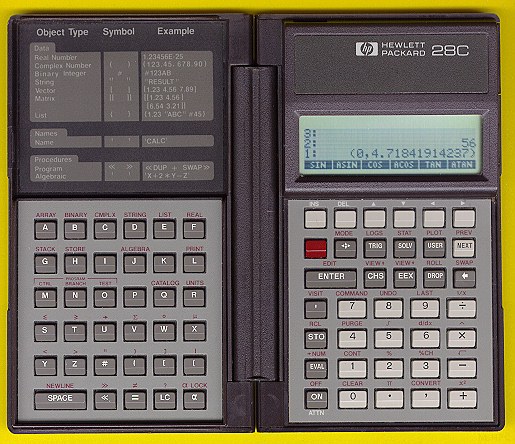 Picture
of HP-28C (~87K)
Picture
of HP-28C (~87K)
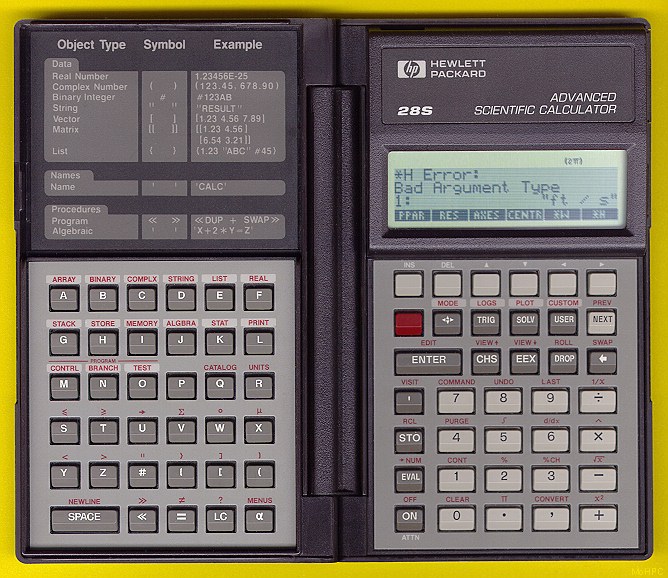 Larger
Picture of an HP-28S (~133K)
Larger
Picture of an HP-28S (~133K)
 Saturn Architecture
 Dimensions
and Weight
Dimensions
and Weight
Price: $235 (Both versions were introduced at this price.)
Production Runs: HP-28C: 1987-1988, HP-28S: 1988-1992
 Go
back to the main exhibit hall
Go
back to the main exhibit hall
 Next Calculator Made
 Previous Calculator Made
 HP-28C features
 Manuals Available